
应用工作流
前端工作流和相关工具的使用及总体构想,了解前端开发在日常工作中的挑战,使用构建工具(gulp)、依赖管理(bower)、脚手架工具(Yeoman)来完成启动、运行和部署应用
软件开发一般分为初始化(project directory、boilerplate code、vendors import) > 开发(compile、hint、local server) > 部署(build、test、assets optimization、deploy)三个阶段,分别对应套用代码(模版代码)、依赖代码(库、依赖)和预处理代码(业务代码)
对应三个基本步骤通过Yeoman脚手架工具创建应用模版、Bower进行依赖管理、Gulp进行代码转换、检测及优化的构建操作
gulp
Gulp构建由具体的task功能函数和gulpfile构成,通过将数据传入到一系列的task中进行转换处理
- <Primary>gulp cli</Primary>:全局安装,本地
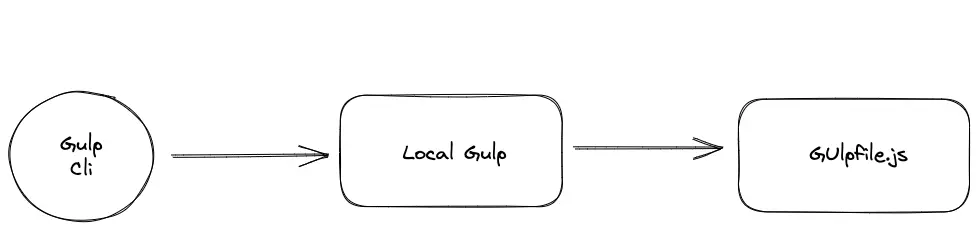
Gulp用作本地Gulp的全局入口,它负责把所有参数转发到本地Gulp并检测其API是否可以正常运行,其拆分目的是为了统一Gulp不同版本下的统一调用 - <Primary>local gulp</Primary>:提供基本的
Gulp Api并根据gulpfile.js加载构建指令和运行定义好的任务 - <Primary>gulpfile.js</Primary>:作为
Gulp运行文件被执行的同时也可以作为目录名称(入口文件则为gulpfile.js > index.js)
Gulp Cli启动本地Gulp > 本地Gulp加载项目中的Gulpfile.js如果找到则会加载其中的内容并尝试执行相应的task
Gulp中的流操作是指从一个源(source)流向一个终点(destination)的数据序列,流是可持续的且没有任何限制的。流分为两种可读流(readable stream)和可写流(writable stream)分别用来使用gulp.src()进行读操作和gulp.dest()进行写操作由这两部作为起始和结尾的操作构成一个task
Virtual File Object虚拟文件对象是一个数据类型以供流用于记录输入源的文件元信息并被转化后的文件用作关联对应关系
- 虚拟文件对象包含文件名、文件原始内容和路径,和标准流不同的是标准流一旦开启就不会记住任何文件原始的内容
- 每个虚拟文件对象都有一个缓冲(
buffer),一旦文件加载好内容就存在于内存中
当流刚打开时,它会把所有的原始文件封装到一个虚拟文件对象中,之后在虚拟文件系统或者Vinyl中处理这些文件
Vinyl对象是虚拟文件系统中的文件对象,存储在内存中相对于硬盘io效率更高例如gulp-concat
Series、Parrallel串行、并行执行链可以根据具体情形创建依赖链(执行任务的同时执行其他依赖项)或执行链组合使用
Gulp.watch触发条件:
- 现有文件的变动:每当文件被保存到文件系统并且时间戳发生改变时,就会触发
task - 文件系统中新增了符合规则的文件:当新增文件时,会触发
task - 文件系统中删除了符合规则的文件:当删除文件时,会触发
task
bower
Bower作为一个依赖管理通过和组件仓库通信来决定直接下载一个依赖还是由开发者来做决定,结合Gulp构建流程可以将安装的依赖列表统一进行转换操作
component组件是指可复用的、独立实现某种功能的包
dependency依赖作为组件满足独立完整原则时所需要的原子组件
component repositoryBower组件仓库只保存元信息,组件本身则保存在其他git仓库中
dependency tree依赖树分为嵌套依赖树、扁平依赖树和混合依赖树
- <Primary>嵌套依赖树</Primary>:每个组件都有自己的依赖而不是公用一个,这能确保组件依赖的版本能够让组件正常工作不会发生冲突。但容易使代码库变得臃肿混乱
- <Primary>扁平依赖树</Primary>:每个组件都只有一个版本不会存在多个副本,但是容易出现版本冲突
- <Primary>半嵌套/扁平依赖树</Primary>:同时具备嵌套、扁平依赖树的优点
Bower采用扁平依赖树管理通过安装时提示版本差异冲突提示用户手动处理,结合Gulp将依赖集成至入口html中或者将依赖列表集成转换并拼接到一个vendor中
- 使用
wiredep注入到入口文件中
<!-- bower:js -->
<!-- endbower -->
<script src="scripts/main.min.js"></script>
const wiredep = require('wiredep').stream;

gulp.task('deps', () => {
  return gulp.src('app/**/*.html')
          .pipe(wiredep())
          .pipe(gulp.dest('dist'))
})
gulp.task('default',
  gulp.series('clean',
  gulp.parallel('styles', 'scripts', 'deps')),
  'server',
  /* ... */
)
- 使用
main-bower-files集中转换处理
const mainBowerFiles = require('main-bower-files')

gulp.task('scripts', () => {
  const glob = mainBowerFiles('**/*.js');
  glob.push('app/scripts/**/*.js')
  return gulp.src(glob)
          .pipe(concat('main.min.js'))
          .pipe(uglify())
          .pipe(gulp.dest('dist/scripts'))
})
yeoman
作为高度自定义初始化项目模版、代码的脚手架是工程自动化的必备功能
scaffolding是指项目模版初始化时需要的元素,一般分为固定文件(每个项目必须的文件)、灵活文件(根据不同项目有相应修改的)、可选文件(根据技术栈或其他情形选定的文件)、可恢复文件(通过依赖安装的包)
assembly line组装指令由prompting(安装提示)、writing(写入文件)、installing(安装依赖)构成,其中用户提示选择的可以通过模版替换等方式进行定制化生成
优化及扩展
构建优化
incremental build通过设置since时间戳只对新文件进行构建(只做时间的判断并不会检测内容是否变化)
gulp.task('xxx', () => {
  return gulp.src(
    ['app/scripts/**/*.js'],
    { since: gulp.lastRun('xxx')}
  ).pipe(/* do something */)
})
cache build使用gulp-cached和gulp-remember增加缓存命中提升构建效率
const cached = require('gulp-cached')
const remember = require('gulp-remember')
// ...
gulp.task('scripts', gulp.series('test', () => {
  const glob = mainFiles('**/*.js')
  glob.push('app/scripts/**/*.js')
  return gulp.src(glob, { since: gulp.lastRun('scripts') })
    .pipe(cached('ugly'))
    .pipe(uglify())
    .pipe(remember('ugly'))
    .pipe(concat('main.min.js'))
    .pipe(gulp.dest('dist/scripts'))
}))
- 使用
cached检测每次经过的文件是否存在于缓存当中,如果否则会被传入下一步然后添加到缓存中,如果存在于缓存中就会进一步检查是否比缓存中的更新如果时则传入下一步并更新缓存,如果不是,它们就会从文件流中被丢弃 - 使用
remermber反过滤被缓存的文件流交由后续流程任务处理
<Callout>since不会识别内容是否更新,只会通过时间戳来判断是否需要加入到后续的文件流中。只通过gulp-cached还是要通过gulp.src来读取文件并不能减少读取的操作所以最佳实践是结合gulp-remember保存构建好的缓存添加到文件流中</Callout>
结合这两个插件就可以做到:
- 处理之前没有处理过的文件
- 重新使用之前缓存过的文件
去除在缓存中已经被删除的文件,如果一个文件被删除了,它还会在缓存中这意味着他还会被gulp-remember重新添加到文件流中,即使这个文件已经不存在了。所以同样需要在缓存中删除
const path = reqyure('path')
const slash = require('slash')
const watcher = gulp.watch(['app/scripts/**/*.js'], gulp.parallel('scripts'))

watcher.on('unlink', filePath => {
  delete cached.caches['ugly'][slash(path.join(__dirname, filePath))]
  remember.forget('ugly', slash(path.join(__dirname, filePath)))
})
使用though2流传递来切换环境
const through = require('through2')

function noop() {
  return through.obj();
}

function someTask() {
  // ...
}
const isProd = false

function prod(task) {
  return isProd ? task : noop()
}

gulp.task('server', done => {
  if (!isProd) {
    bSync({
      server: {
        baseDir: ['dist', 'app']
      }
    })
  }
  done()
})
流的使用
穿插流在管道任务执行之前插入新的输入,这可以在执行共同的task之前先分别对不同的输入执行不同的编译操作
gulp.task('scripts', () => {
  return gulp.src('src/scripts/**/*.coffee')
    .pipe(coffee())
    .pipe(gulp.src('src/scripts/**/*.js', {passthrough: true}))
    .pipe(uglify())
    .pipe(gulp.dest('dist/scripts'))
})
<Callout type="info">使用passthrough参数把穿插的新流在指定位置继续向下传递,避免错误类型的代码转换。转换后的结果会是将两个流合成一个流生成的结果</Callout>
合并流不仅可以添加不同的输入类型还可以在合并流之前分别对他们执行不同的操作
const merge = require('merge2')
const coffee = require('gulp-coffee')
const coffeelint = require('gulp-coffeelint')

gulp.task('scripts', () => {
  const coffeeStream = gulp.src('src/scripts/**/*.coffee')
    .pipe(coffeelint())
    .pipe(coffeelint.reporter())
    .pipe(coffeelint.reporter('fail'))
    .pipe(coffee())

  const jsStream = gulp.src('src/scripts/**/*.js')
    .pipe(jshint())
    .pipe(jshint.reporter('default'))
    .pipe(jshint.reporter('fail'))

  return merge(coffeeStream, jsStream)
    .pipe(concat('main.js'))
    .pipe(uglify())
    .pipe(gulp.dest('dist/scripts'))
})
<Callout type="info">与穿插流同样功能的同时,提供了更加灵活可服用的方式很适用于更加复杂的组合场景</Callout>
流数组可以将定义好的参数列表经过mapping函数转化为特定功能的流以供复用同一套构建逻辑
const variations = [
  {
    linttask: coffeelint,
    fail: coffeelint.reporter('fail'),
    compiletask: coffee,
    directory: 'src/scripts/',
    type: 'coffee',
    bundle: 'main-5.1.js'
  },
  {
    linttask: coffeelint,
    fail: coffeelint.reporter('fail'),
    compiletask: coffee,
    directory: 'src/scripts-coffee/',
    type: 'coffee',
    bundle: 'main-5.2.js'
  },{
    linttask: eslint,
    fail: eslint.failAfterError(),
    compiletask: babel,
    directory: 'src/scripts-es6/',
    type: 'es',
    bundle: 'main-5.3.js'
  }
];
function compileScripts(param) {
  const transpileStream = gulp.src(param.directory + '**/*.' + param.type)
    .pipe(param.linttask())
    .pipe(param.fail)
    .pipe(param.compiletask());
  const jsStream = gulp.src(param.directory + '**/*.js')
    .pipe(jshint())
    .pipe(jshint.reporter('fail'));

  return merge(transpileStream, jsStream)
    .pipe(concat(param.bundle))
    .pipe(uglify())
    .pipe(gulp.dest('dist/scripts'));
}
gulp.task('scripts', function() {
  const streams = variations.map(function(el) {
     return compileScripts(el);
  });
  return merge(streams);
});
<Callout type="info">通过传入配置的方式生成构建流更好的复用和维护代码,缺点是需要维护很多模版变量</Callout>
流的snippet可以把一些共同的操作打包称一个函数并复用到task中避免重复代码
const combiner = require('stream-combiner2');
function combine(output) {
  return combiner.obj(
    concat(output),
    uglify()
  );
}
gulp.task('vendor', function() {
  return gulp.src('src/vendor/**/*.js')
    .pipe(combine('vendor.js'))
    .pipe(gulp.dest('dist'));
});
gulp.task('scripts', function() {
  return gulp.src('src/**/*.js')
    .pipe(jshint())
    .pipe(jshint.reporter('fail'))
    .pipe(combine('bundle.js'))
    .pipe(gulp.dest('dist'));
});
<Callout type="info">相对于配置列表流,把关注点分离到具体任务和抽离出的公共配置通过组合的方式避免重复代码提升可维护性</Callout>
流队列通过streamqueue保持有序的输出结果
const queue  = require('streamqueue').obj;
gulp.task('styles', function() {
  return queue(
    gulp.src(mainBowerFiles('**/*.css')),
    gulp.src('styles/lib/lib.css')
        .pipe(cssimport()),
    gulp.src('styles/less/main.less')
        .pipe(less())
  ).pipe(autoprefixer())
  .pipe(concat('main.css'))
  .pipe(gulp.dest('dist/styles'));
});
<Callout type="info">适用于对于需要输出结果保持顺序的情形</Callout>
流filter过滤出指定规则的文件流
const filter = require('gulp-filter')
gulp.task('scripts', () => {
  const babelFilter = filter('*.babel.js', {restore:true})
  const vendorFilter = filter('!vendor/**/*.js', {restore:true})
  return gulp.src('scripts/**/*.js')
    .pipe(vendorFilter)
    .pipe(eslint())
    .pipe(babelFilter)
    .pipe(babel())
    .pipe(babelFilter.restore)
    .pipe(vendorFilter.restore)
    .pipe(uglify())
    .pipe(concat('main.js'))
    .pipe(gulp.dest('dist'))
})
<Callout type="info">通过过滤掉不合适的文件来条件性构建,待处理函数执行后再恢复</Callout>